# NextCloud Problem Solutions: No Video Thumbnail
This installation guide is tested with Nextcloud up to version 16.x and Preview Generator App up to version 2.x.
#### Tested and working file formats
avi, doc, bmp, gif, jpg, md, mkv, mp3, mp4, odp, ods, odt, pdf, png, psd, svg, tif, ttf, txt, xls.
#### Update your system
```
apt upgrade && apt -y update
```
#### Install the Preview Generator App
of the Nextcloud app store: [apps.nextcloud.com/apps/previewgenerator](https://apps.nextcloud.com/apps/previewgenerator)
#### Install LibreOffice
```
apt install libreoffice libreoffice-l10n-de libreoffice-help-de
```
#### Install ffmpeg, ImageMagick and Ghostscript
```
apt install ffmpeg imagemagick ghostscript
```
#### Add preview providers
Append to `/var/www/nextcloud/config/config.php`
```
'preview_libreoffice_path' => '/usr/bin/libreoffice',
'enable_previews' => true,
'enabledPreviewProviders' =>
array (
0 => 'OC\\Preview\\TXT',
1 => 'OC\\Preview\\MarkDown',
2 => 'OC\\Preview\\OpenDocument',
3 => 'OC\\Preview\\PDF',
4 => 'OC\\Preview\\MSOffice2003',
5 => 'OC\\Preview\\MSOfficeDoc',
6 => 'OC\\Preview\\Image',
7 => 'OC\\Preview\\Photoshop',
8 => 'OC\\Preview\\TIFF',
9 => 'OC\\Preview\\SVG',
10 => 'OC\\Preview\\Font',
11 => 'OC\\Preview\\MP3',
12 => 'OC\\Preview\\Movie',
13 => 'OC\\Preview\\MKV',
14 => 'OC\\Preview\\MP4',
15 => 'OC\\Preview\\AVI',
),
```
#### Create .cache folder
on ISPConfig servers in the [home directory of virtual host](https://www.allerstorfer.at/ispconfig-add-additional-folder-in-home-directory-of-a-virtual-host/) to prevent
```
unable to create directory '/var/www/clients/client1/web1/.cache/dconf': Operation not permitted. dconf will not work properly
```
Only necessary for for office documents like .ods and .odt.
#### Fix PolicyMap for ImageMagick
to prevent [ImagickException: not authorized](https://www.allerstorfer.at/imagemagick-fix-policymap/) error. Necessarry for PDF files.
#### First Run
```
sudo -u www-run php /var/www/nextcloud/occ preview:generate-all -vvv
```
#### Add Cronjob
```
crontab -u www-run -e
```
```
*/10 * * * * php /var/www/nextcloud/occ preview:pre-generate -vvv
```
#### My Config file:
just for debug
```php
'/',
'memcache.local' => '\\OC\\Memcache\\APCu',
'apps_paths' =>
array (
0 =>
array (
'path' => '/var/www/html/apps',
'url' => '/apps',
'writable' => false,
),
1 =>
array (
'path' => '/var/www/html/custom_apps',
'url' => '/custom_apps',
'writable' => true,
),
),
'memcache.distributed' => '\\OC\\Memcache\\Redis',
'memcache.locking' => '\\OC\\Memcache\\Redis',
'redis' =>
array (
'host' => 'AAAAAAAAAAAAAAAAAAAAAAAAAAAAAAAAAAAAAA',
'password' => '',
'port' => 6379,
),
'upgrade.disable-web' => true,
'instanceid' => 'AAAAAAAAAAAAAAAAAAAAAAAAAAAAAAAAAAAA',
'passwordsalt' => 'AAAAAAAAAAAAAAAAAAAAAAAAAAAAAAAAAAAAAAAAAAAA',
'secret' => 'AAAAAAAAAAAAAAAAAAAAAAAAAAAAAAAAAAAAAAAAAAAAAAAAAAA',
'trusted_domains' =>
array (
0 => 'AAAAAAAAAAAAAAAAAAAAAAAAAAAAAAAAAAAAAAAAAAAAA',
1 => 'AAAAAAAAAAAAAAAAAAAAAAAAAAAAAAAAAAAAAAAAAAAAAAAA',
),
'overwriteprotocol' => 'https',
'overwritehost' => 'AAAAAAAAAAAAAAAAAAAAAAAAAAAAAAAAAAAAAAAAA',
'trustedproxies' =>
array (
0 => 'AAAAAAAAAAAAAAAAAAAAAAAAAAAAAAAAAAAA',
1 => 'AAAAAAAAAAAAAAAAAAAAAAAAAAAAAAAAAAAAAAAAAAAAAAAA',
),
'datadirectory' => '/var/www/html/data',
'dbtype' => 'mysql',
'version' => '30.0.6.2',
'overwrite.cli.url' => 'AAAAAAAAAAAAAAAAAAAAAAAAAAAAAAAAAAAAAAAAAA',
'dbname' => 'AAAAAAAAAAAAAAAAAAAAAAAAAAAAAA',
'dbhost' => 'AAAAAAAAAAAAAAAAAAAAAAAAAAAAAAAAAAAAAAA',
'dbport' => '',
'dbtableprefix' => 'oc_',
'mysql.utf8mb4' => true,
'dbuser' => 'oc_son',
'dbpassword' => 'AAAAAAAAAAAAAAAAAAAAAAAAAAAAAAAAAAAAA',
'installed' => true,
'maintenance_window_start' => 8,
'mail_from_address' => 'son',
'mail_smtpmode' => 'smtp',
'mail_sendmailmode' => 'smtp',
'mail_domain' => 'AAAAAAAAAAAAAAAAAAAAAAAAAAAAAAAAAAAAAAAAA',
'mail_smtphost' => 'AAAAAAAAAAAAAAAAAAAAAAAAAAAAAAAAAAAAA',
'mail_smtpport' => '8025',
'default_phone_region' => 'VN',
'maintenance' => false,
'enable_previews' => true,
'preview_libreoffice_path' => '/usr/bin/libreoffice',
'enabledPreviewProviders' =>
array (
0 => 'OC\\Preview\\TXT',
1 => 'OC\\Preview\\MarkDown',
2 => 'OC\\Preview\\OpenDocument',
3 => 'OC\\Preview\\PDF',
4 => 'OC\\Preview\\MSOffice2003',
5 => 'OC\\Preview\\MSOfficeDoc',
6 => 'OC\\Preview\\Image',
7 => 'OC\\Preview\\Photoshop',
8 => 'OC\\Preview\\TIFF',
9 => 'OC\\Preview\\SVG',
10 => 'OC\\Preview\\Font',
11 => 'OC\\Preview\\MP3',
12 => 'OC\\Preview\\Movie',
13 => 'OC\\Preview\\MKV',
14 => 'OC\\Preview\\MP4',
15 => 'OC\\Preview\\AVI',
),
);
```
#### Tips #1:
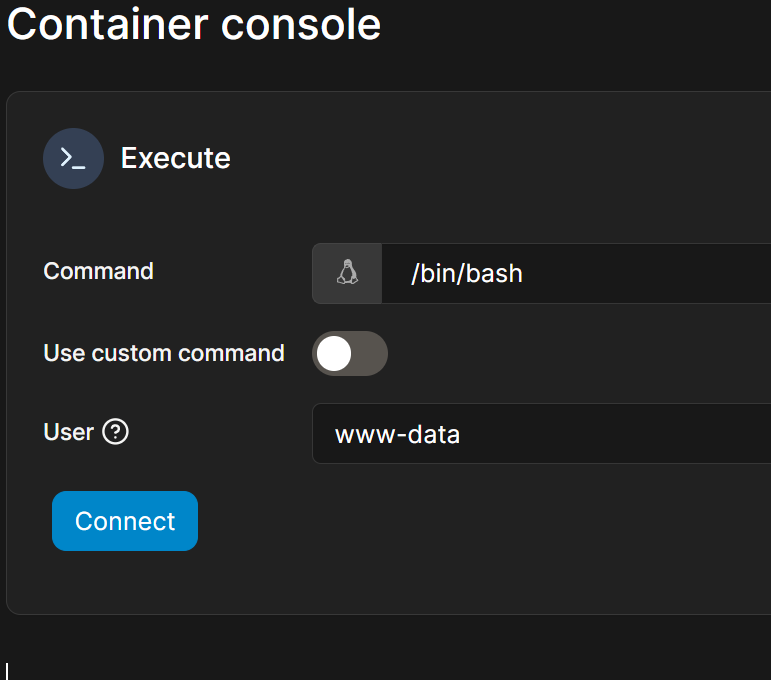
when using docker you need to login as root or www-data in order to fix the issues with nextcloud:
www-data
root
#### Tips #2:
php occ \[COMMAND\]
[](https://wiki.kyluat.com/uploads/images/gallery/2025-02/image.png)
#### Docker Compose config stack for portainer:
```yaml
services:
nextcloud:
image: nextcloud:stable
container_name: nextcloud-stable
restart: always
environment:
MYSQL_PASSWORD: XXXXXXXXXXXXXXXXXXXXXXXXXX
MYSQL_DATABASE: BBBBBBBBBBBBBBBBBBBBBBBBBB
MYSQL_USER: AAAAAAAAAAAAAAAAAAAAAAAAAAAA
MYSQL_HOST: CCCCCCCCCCCCCCCCCCCCCCCCCC
REDIS_HOST: DDDDDDDDDDDDDDDDDDDDDDDDDD
PUID: 1000
PGID: 1000
TZ: Asia/Ho_Chi_Minh
ports:
- 8180:80
- 8443:443
volumes:
- /mnt/portainer/nextcloud/html:/var/www/html
- /mnt/portainer/nextcloud/config://var/www/html/config
- /mnt/portainer/nextcloud/custom_apps://var/www/html/custom_apps
- /mnt/portainer/nextcloud/data:/var/www/html/data
- /mnt/portainer/nextcloud/logs:/var/log/apache2
networks:
- nginxproxymanager_default
networks:
nginxproxymanager_default:
external: true
```
i mounted to my nfs volume which link to my synology data storage through nfs
### Some path to take alook:
/etc/apache2/
/var/log/apache2/
looks for logs and ask chatgpt to install required apps for apache and os. eg:
```bash
apt update && apt install -y iproute2
apt update && apt install -y fuse
```
How to fix the error message „ImagickException: not authorized“:
```
ImagickException: not authorized `/tmp/magick-............' @ error/constitute.c/ReadImage/412
```
```
vi /etc/ImageMagick-6/policy.xml
```
Change `rights="none"` to `rights="read|write"` for PS, EPI, PDF and XPS
```
```
##### Restart services
```
service apache2 restart && service php7.2-fpm restart
```
### Nextcloud: Install Crontab
apt update && apt install -y cron
crontab -e
crontab -u www-data -e
[](https://wiki.kyluat.com/uploads/images/gallery/2025-02/Fy7image.png)
ISPConfig sets the immutable bit of a vHost’s home directory, which prevents adding/deleting files or folders there. To add a custom folder, the immutable bit must first be reset, which can only be done as the *root* user.
In this example, we want to create the additional folder .cache within the home directory.
```
chattr -i /var/www/clients/client1/web1
mkdir /var/www/clients/client1/web1/.cache
chown web1:client1 /var/www/clients/client1/web1/.cache
chattr +i /var/www/clients/client1/web1
```
If PHP needs to write to the new folder, add the path to PHP open\_basedir as well.
#### See also
[https://www.allerstorfer.at/nextcloud-install-preview-generator/](https://www.allerstorfer.at/nextcloud-install-preview-generator/)